
As part of your ORCID membership, ORCID provides member and integration reports that you can access and download as and when required. Member Reporting is available to all members and provides insights into how integrations are being used, the number of researchers that have connected their iDs to the integration, alongside the number of records which have been updated.
ORCID also provides an Affiliation Report which is available to all members (most relevant to Research Organization members) and a Consortia Dashboard which is only available to our Consortia Lead organisations.
Your reports are available via the ORCID Member Portal. All ORCID members have access to the ORCID Member Portal. If you are an active member and do not have access to the portal then please let us know.
From within the member portal you will be able to access your reports from the ‘Tools’ menu.
Member Report
The member report provides a high level overview of how your organization’s integrations are performing as a whole.
Below is the list of sections that we display within the report with a brief description of each item.
API reads: Number of API GET calls overtime that your integration has made.
Monthly Integration Sign-In Events (Jan 2024 Onwards): Number of sign-ins overtime that have connected to your integration via OAuth.
Total unique iDs: The number of researchers that have granted permission to an integration belonging to your organization. This includes read-only and update permissions. Each researcher is only counted once, no matter how many integrations they have connected with.
Your integrations: A list of integrations for your organization using the member API with accompanying counts of Connected iDs and records updated. Also included the name of the third party system being used ti integrate with ORCID where applicable.
New users per year: A chart showing users connecting to each of your integrations over time.
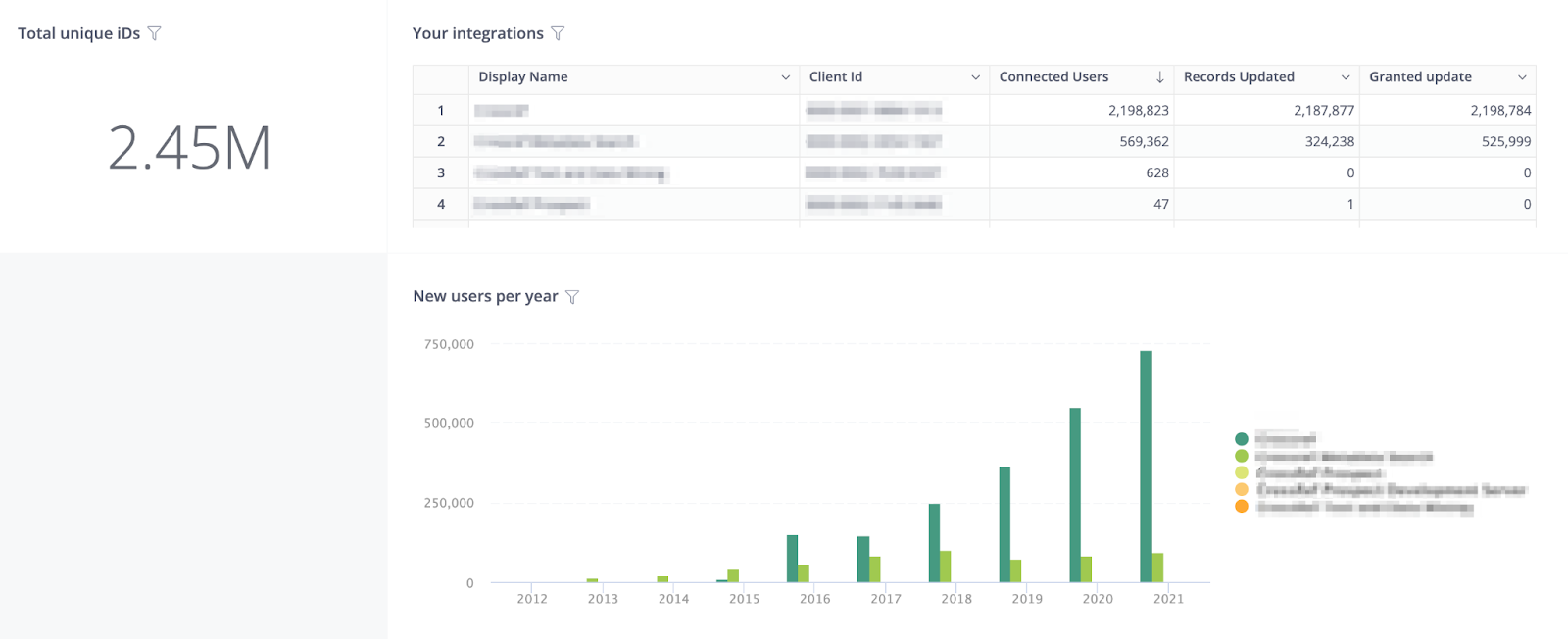
Total records updated: The number of researchers that have benefitted from automatic updates to their records made by your integrations
Unique iDs connected per year: A graph showing Connected iDs broken down by year.
Records updated per year by integration: The number of researchers that have benefitted from automatic updates to their records made by your integrations


Records updated with affiliations: A metric counting how many iDs have been updated by your integrations with a particular item type, e.g. works, affiliations
Total affiliations added: A metric counting how many of a particular item have been added
Types of affiliations added: A percentage of how many of each affiliation type has been added, e.g. Employment, Education
Org identifiers added: A table listing the affiliation types and the organization IDs used by your integration when adding affiliations to records, along with a count of records updated with that organization ID.
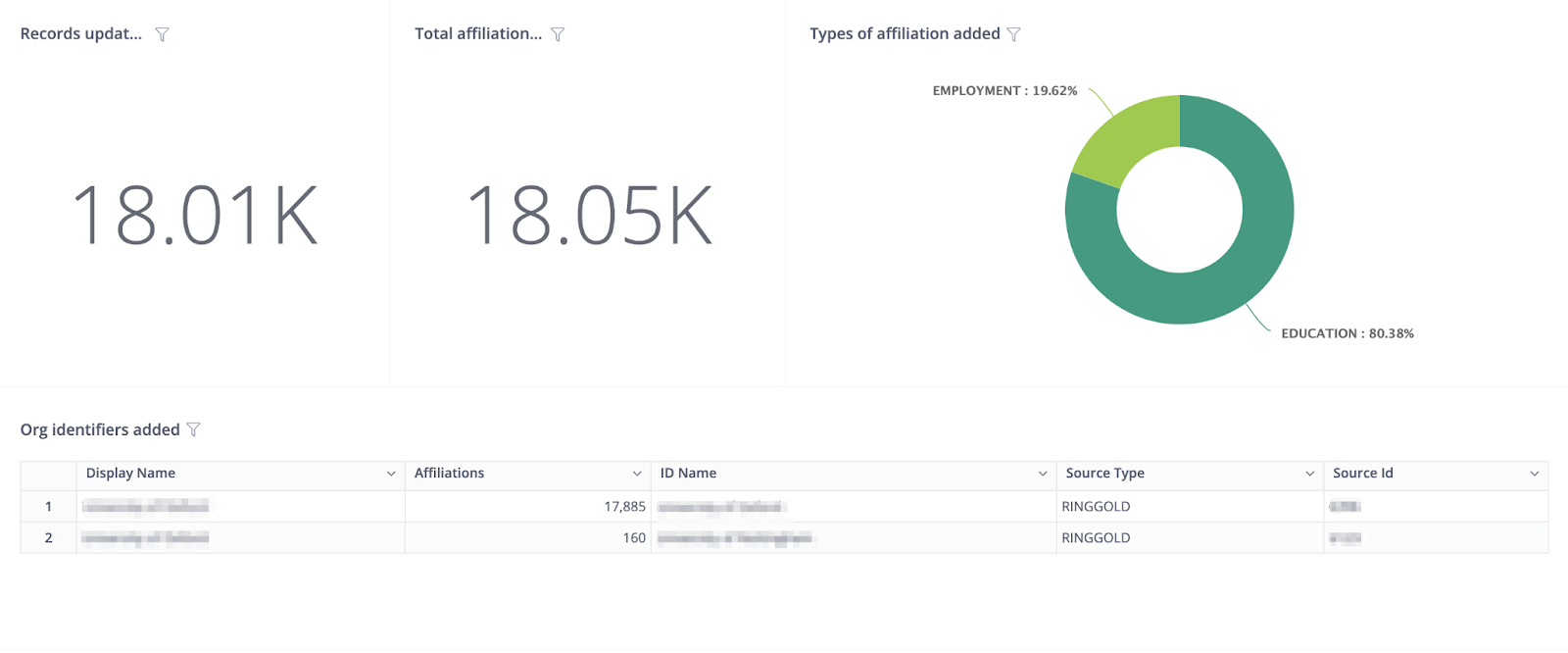
Total items added per year by integration: A graph showing the number of items added by your integrations every year
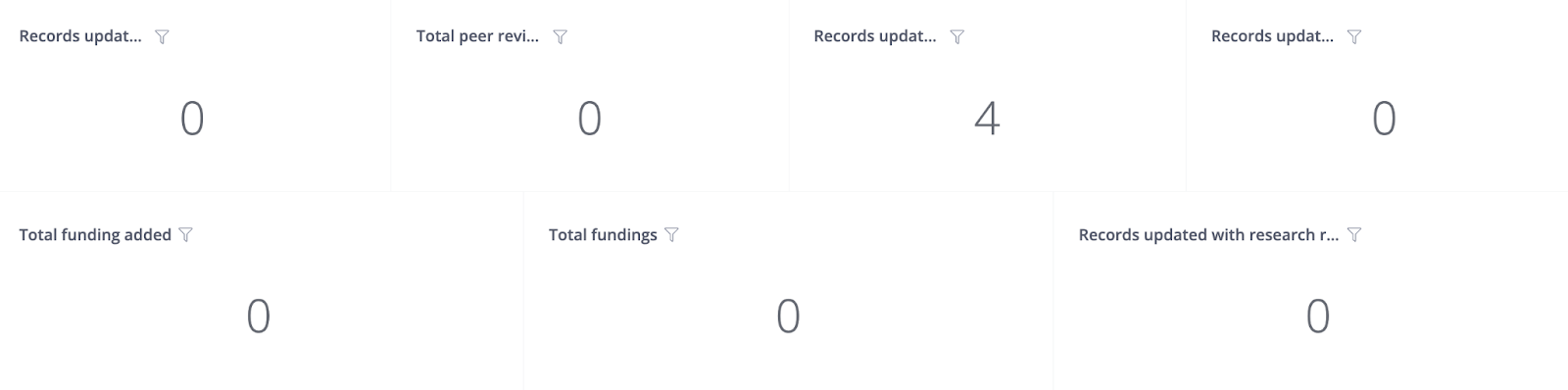
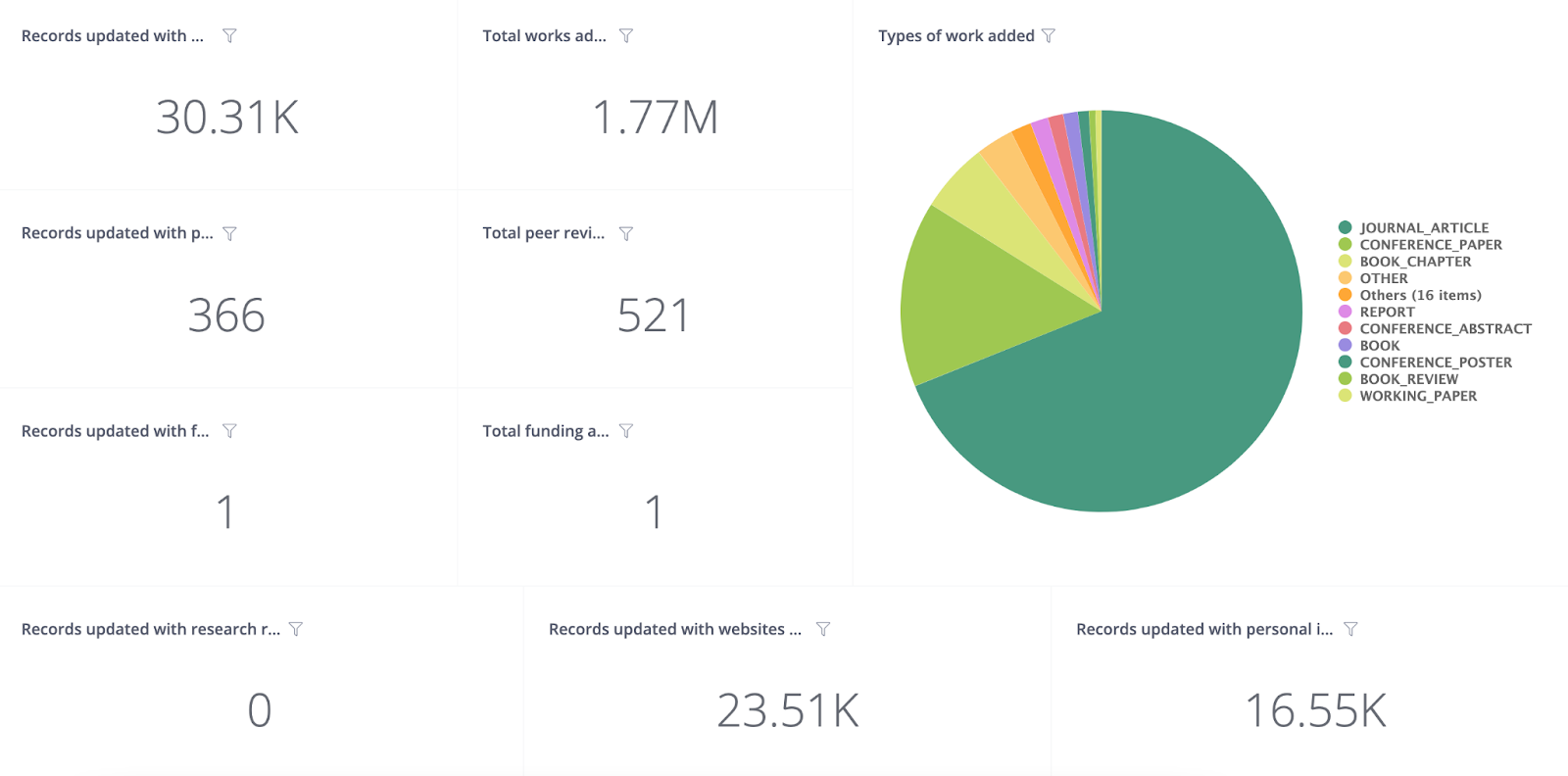
Records updated with works: The number of records that have had at least one work added by an integration
Total works added: The total number of works added by your integrations
Types of works added: A percentage of how many of each work type has been added, e.g. Journal Article, Preprint
Records updated with peer review: The number of records that have had at least one peer review added by an integration
Total peer review added: The total number of peer reviews added by your integrations
Records updated with websites & social links: The number of records that have at least one website & social link added by an integration
Records updated with personal identifiers: The number of records that have at least one personal identifier added by an integration
Records updated with funding: The number of records that have at least one funding added by an integration
Total funding added: The total number of funding added by your integrations
Records updated with research resources: The number of records that have at least one research resource added by an integration

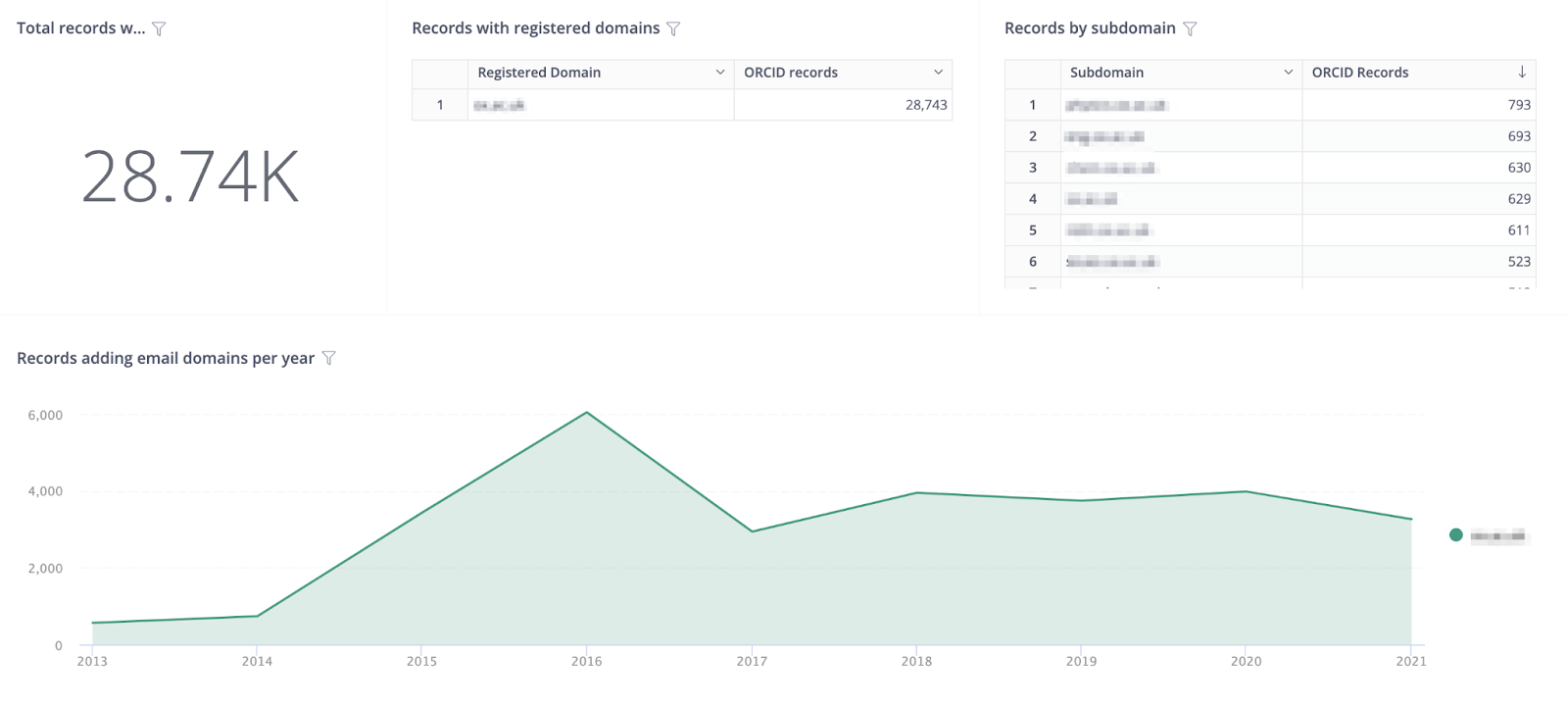
Total records with domains: A metric counting the total number of iDs that have an email address ending in one of the registered domains. If the record has an email address with more than one of the registered domains they will be included in the count more than once. If you would like additional domains added then please let us know.
Records with registered domains: A list of your registered email domains along with the number of records using that domain.
Records by subdomain: A list of your registered email sub domains along with the number of records using that sub domain
Records adding email domains per year: A graph showing the use of registered domains over time. Researchers may have registered more than one email address, and this graph counts all of the researcher’s addresses.
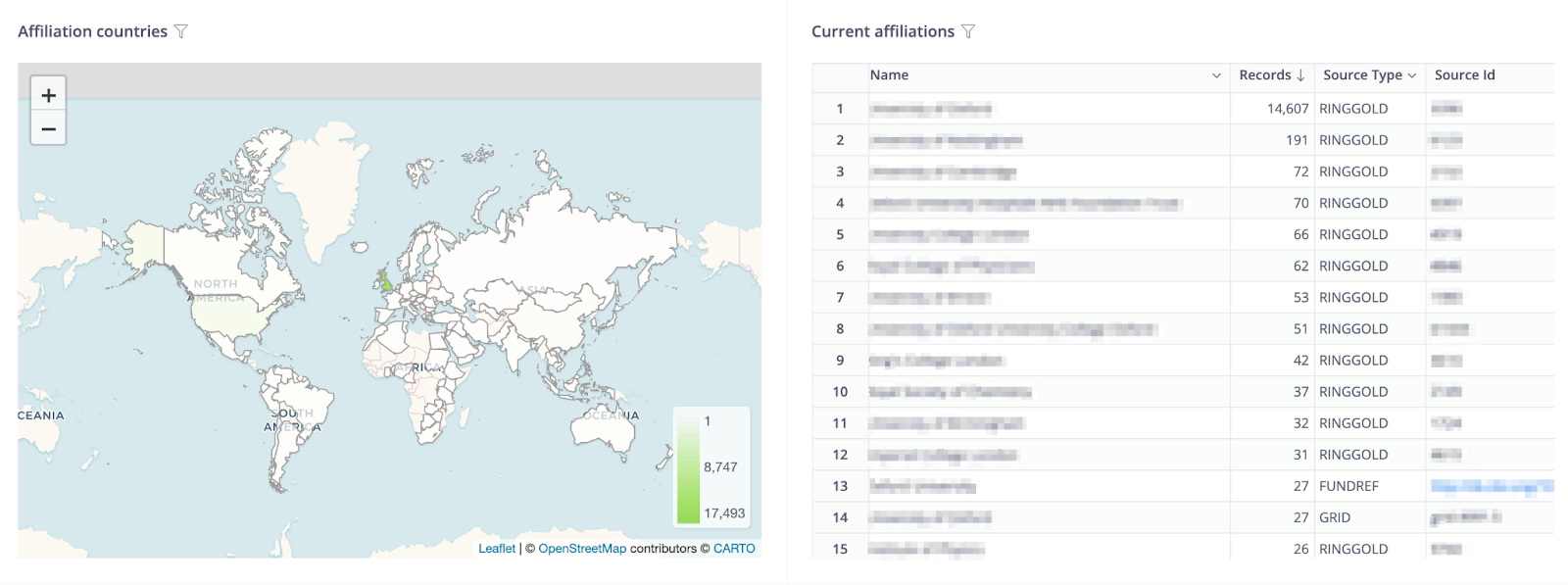
Affiliation countries: A chart showing the country codes within the affiliation metadata of Connected IDs.
Current affiliations: A table listing affiliations found on all iDs with country code, broken down by organization ID and type. Only includes current affiliations, i.e. those without an end date.
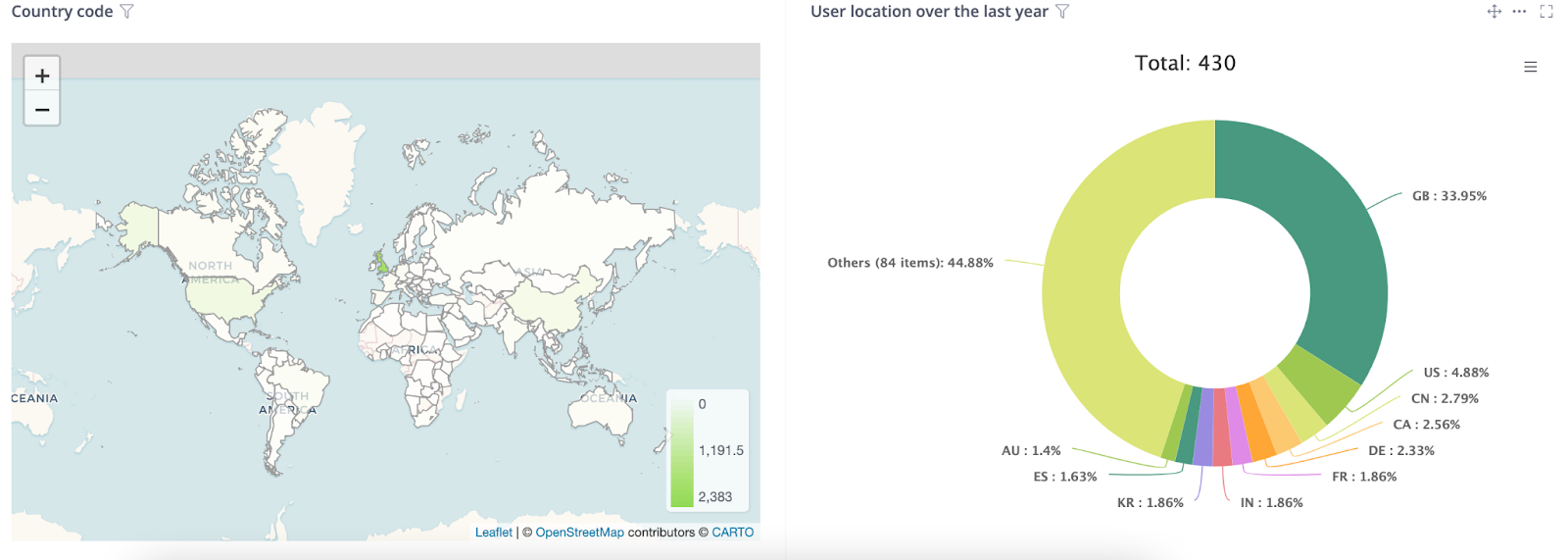
Country code: A chart showing the country codes constrained within the biographical metadata of Connected IDs.
User location over the last year: A chart showing where your user was based when granting permission to your organisation via OAuth
Integration Report
When you click on the integration report, a page will appear where you have to select the relevant integration from the dropdown list. The integration report provides high level overview of how your organization’s individual integrations are performing.
API reads: Number of API GET calls overtime that your integration has made.
Monthly Integration Sign-In Events (Jan 2024 Onwards): Number of sign-ins overtime that have connected to your integration via OAuth.
This section shows the number of researchers interacting with your integrations.
Connected iDs: The number of researchers that have granted permission to an integration belonging to your organization. This includes read-only and update permissions. Each researcher is only counted once, no matter how many integrations they have connected with.
Connected iDs: List of connected ORCID iDs including record name.
Records Updated with this integration: The number of researchers that have benefitted from automatic updates to their records made by your integrations
iDs first connected: A graph showing Connected iDs over time.
Records first updated: A graph showing Records Updated over time. Each iD is counted once, according to the year they were first updated
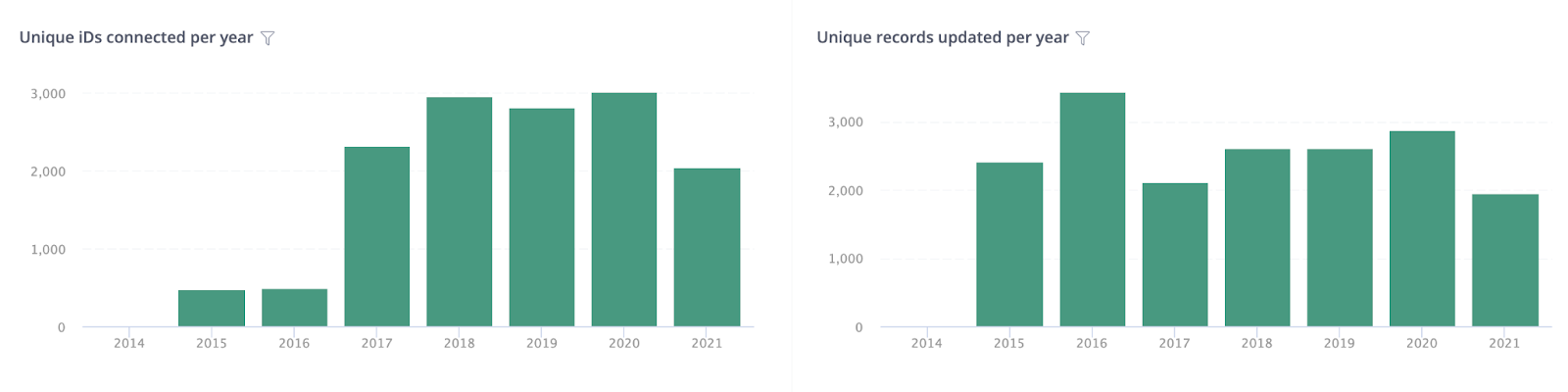
Unique iDs connected per year: A graph showing Connected iDs broken down by year.
Unique records updated per year: A graph showing Records Updated broken down by year.¬¨‚

This section shows the number of records your integrations have updated
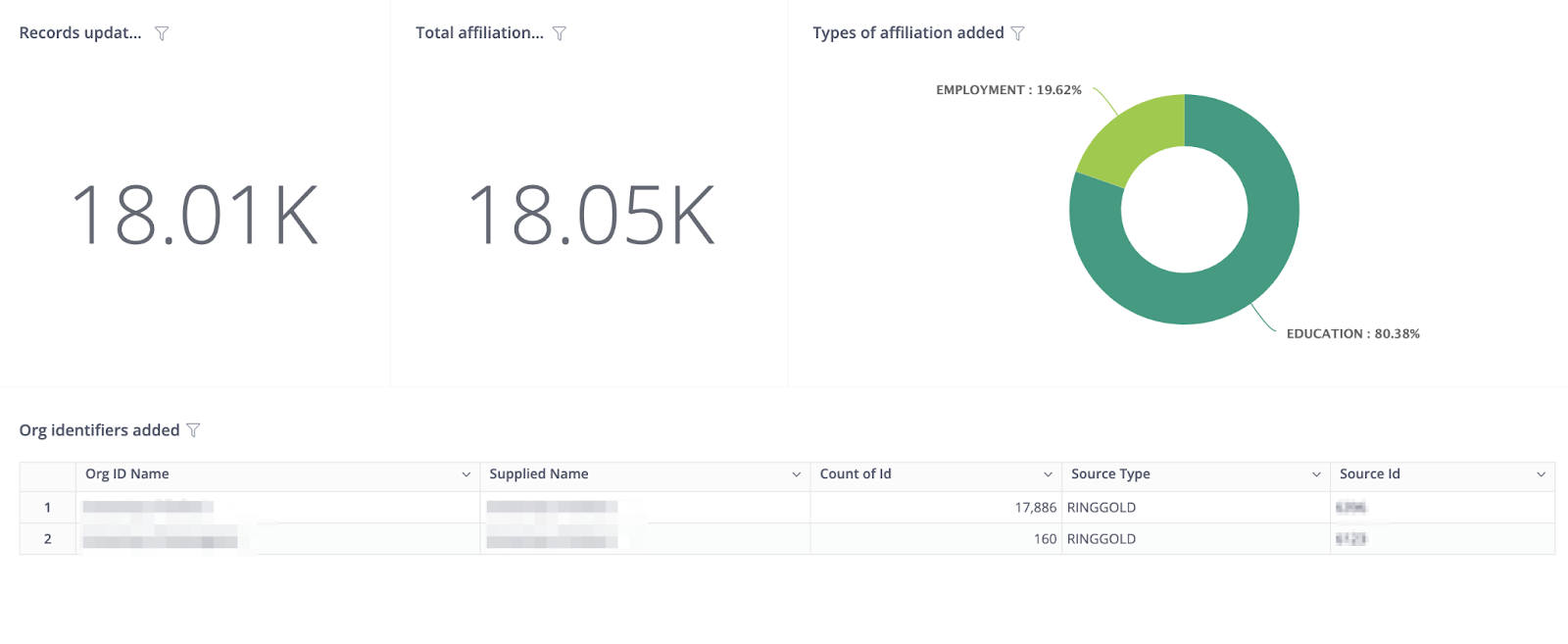
Records updated with affiliations: A metric counting how many iDs have been updated by your integrations with affiliations.
Total affiliations added: A metric counting how many affiliations have been added
Types of affiliation added: A percentage of how many of each affiliation type has been added, e.g. Employment, Education
Org identifiers added: A table listing the affiliation types and the organization IDs used by your integration when adding affiliations to records, along with a count of records updated with that organization ID.
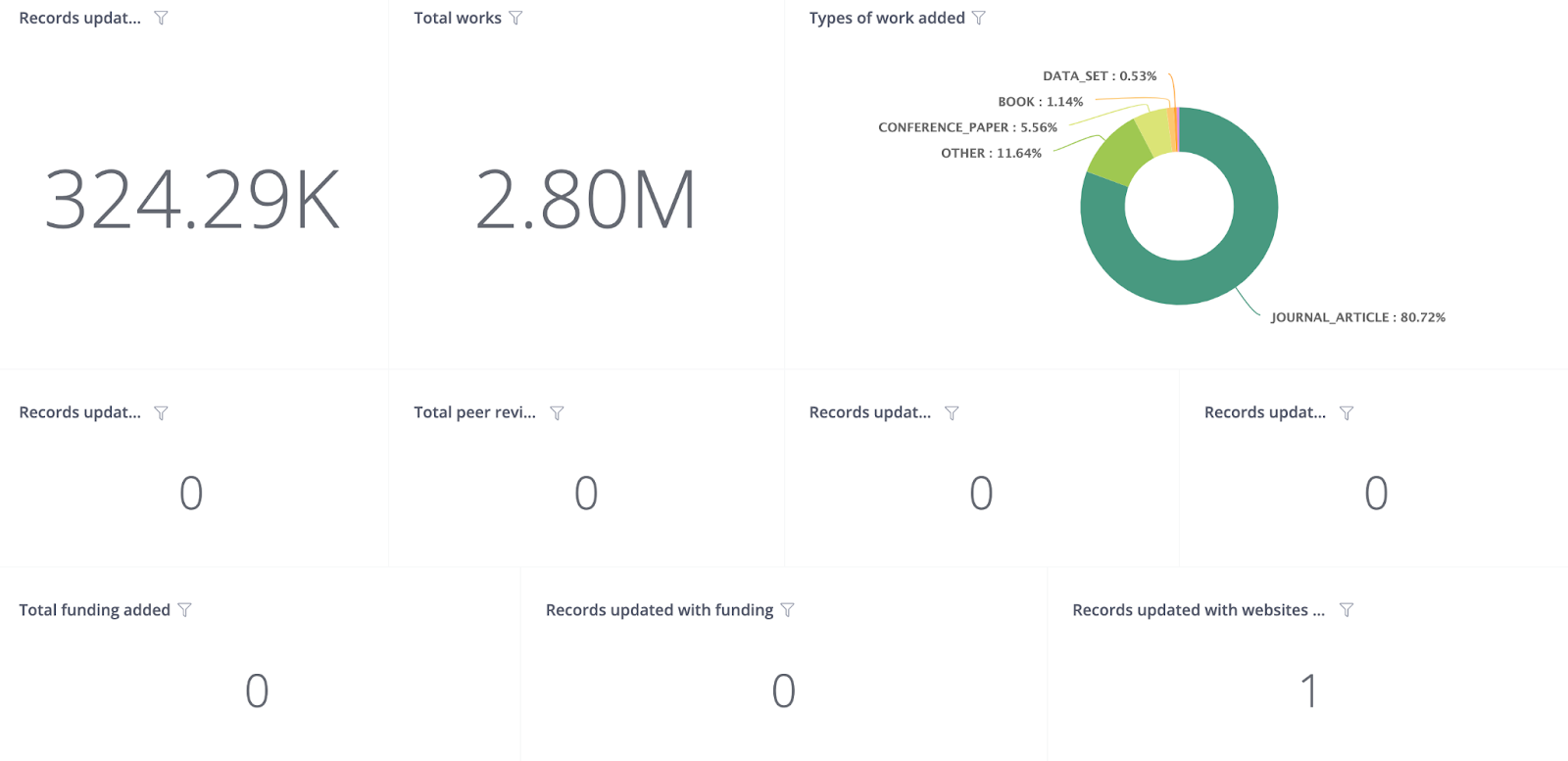
Records updated with works: A metric counting how many iDs have been updated by your integrations with works
Total works added: A metric counting how many works have been added
Types of work added: A percentage of how many of each work type has been added, e.g. Journal Article, Preprint
Records updated with peer reviews: A metric counting how many records have been updated by your integrations with a peer review
Total peer reviews added: A metric counting how many peer reviews have been added
Records updated with funding: A metric counting how many records have been updated by your integrations with a funding
Total funding added: A metric counting how many funding have been added
Records updated with a personal identifier: A metric counting how many records have been updated by your integrations with a personal identifier
Records updated with research resources: A metric counting how many records have been updated by your integrations with a research resources
Records updated with websites & social links: A metric counting how many records have been updated by your integrations with a website or social link
This section shows where the connected iD‚s originate
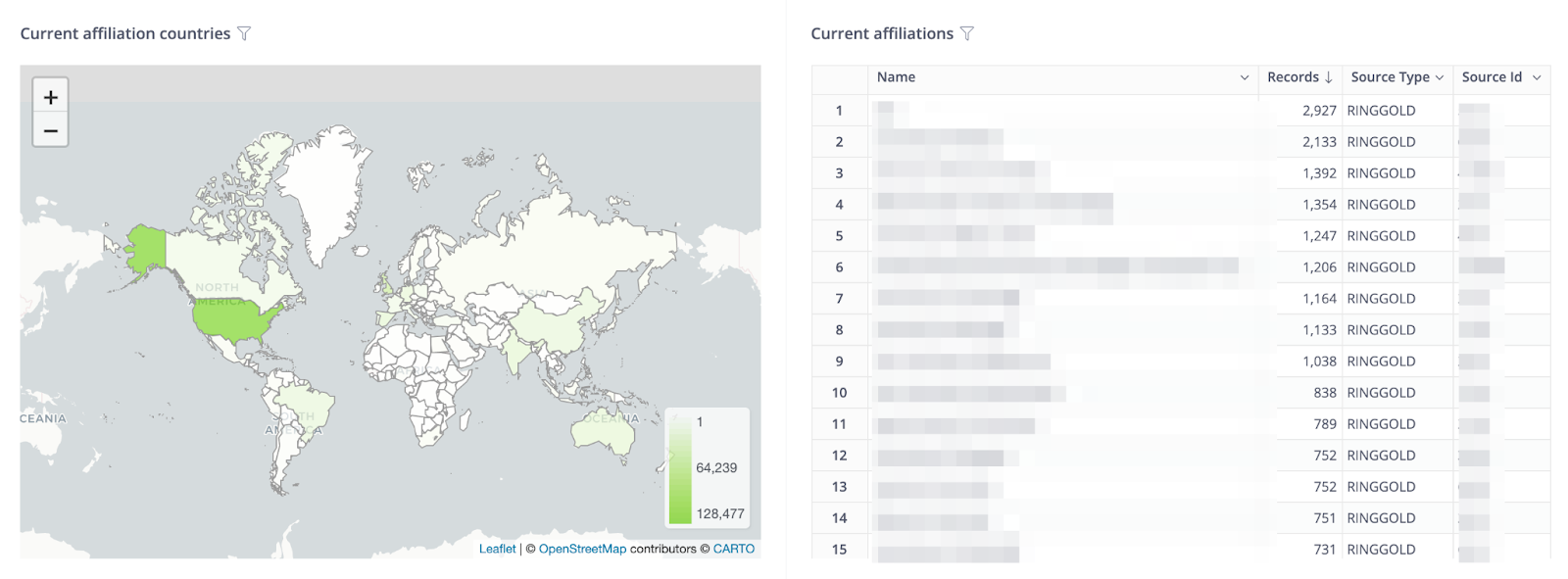
Current affiliation countries: A chart showing the country codes within the affiliation metadata of Connected IDs.
Current affiliations: A table listing affiliations found on all iDs with country code, broken down by organization ID and type. Only includes current affiliations, i.e. those without an end date.
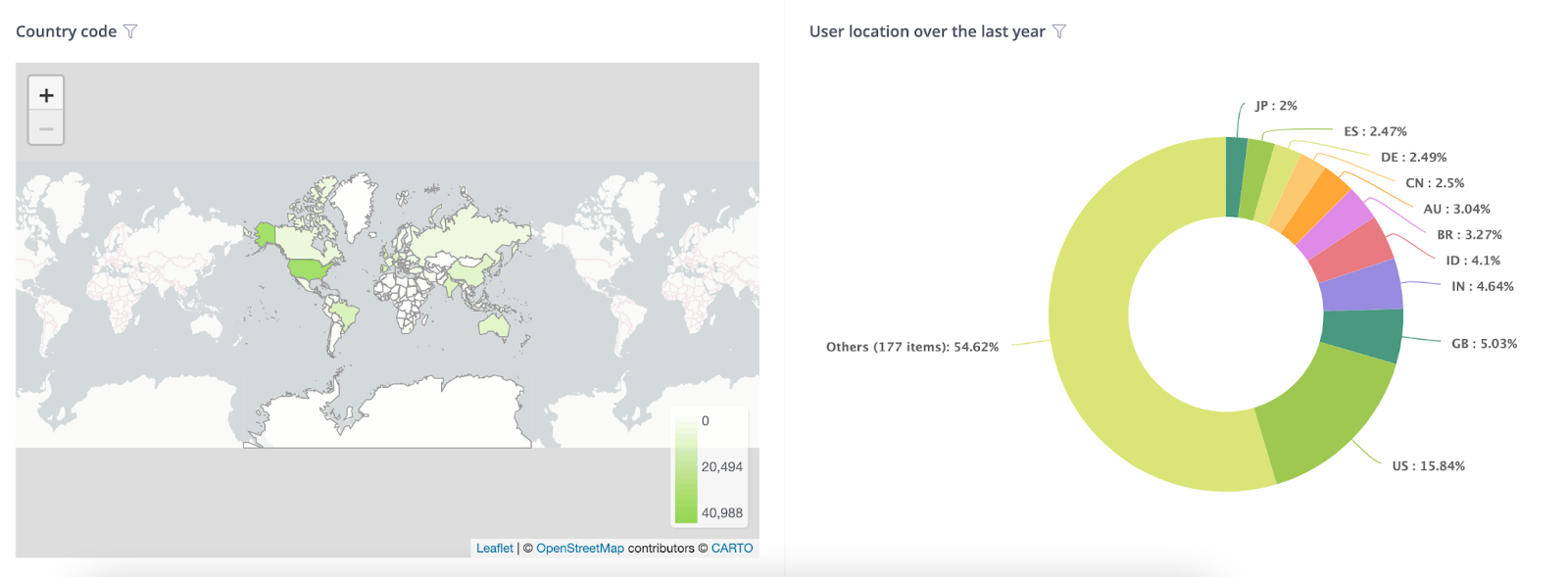
User location: A chart showing where your user was based when granting permission to your organisation via OAuth
Country code: A chart showing the country codes constrained within the biographical metadata of Connected IDs.
Affiliation Report
The affiliation reports shows ORCID iDs for all of the researchers affiliated with your organization and allows for download of ORCID iDs, names, and affiliation details as CSV to cross-reference with internal organizational systems such as HRIS or CRIS
Registered Organization IDs – This section shows the organization IDs that have been used for generating the data on the report. These are the IDs that we have registered against your ORCID membership.
Number of Affiliated Records – The total number of ORCID records that have a public affiliation (employment, education, qualifications, membership, services, invited positions and distinctions) within the registry for your organization. Please note, there may be more that are within the registry that do not have an organization ID attached or that do not have the visibility setting of ‘Everyone’
Number of records with a current affiliation – The total number of ORCID records that have a current public affiliation within the registry for your organization. A current affiliation is an affiliation that does not have an end date populated. Please note, there may be more that are within the registry that do not have an organization ID attached or that do not have the visibility setting of ‘Everyone’
Number of records with a current employment affiliation – The total number of ORCID records that have a current public employment affiliation within the registry for your organization. A current affiliation is an affiliation that does not have an end date populated. Please note, there may be more that are within the registry that do not have an organization ID attached or that do not have the visibility setting of ‘Everyone’
Total Affiliations – The total number of public affiliations within the registry for your organization. This includes current and past affiliations. Please note, there may be more that are within the registry that do not have an organization ID attached or that do not have the visibility setting of ‘Everyone’
Affiliations Created Over Time – A graph that shows the number of affiliations that have been added to the registry over time. The graph is split by affiliations that your organization has added and the affiliations that have been added by your researchers manually
Affiliations Created Over Time by Type – A graph that shows the types of affiliations that have been added over time.
Affiliations created Over Time by ORG ID – A graph that shows the number of affiliations added by ORG ID over time.
Publicly affiliated ORCID Records – A list of ORCID records that have a public affiliation to your organization. Public affiliations are those which visibility is set to “everyone” in the registry. The list contains the ORCID iD, given name, family name and credit name
Publicly currently employed ORCID Records – A list of ORCID records that have a public employment affiliation to your organization. Public affiliations are those which visibility is set to “everyone” in the registry. The list contains the ORCID iD, given name, family name and affiliation start date
Public Affiliations with affiliation data– A list of the public affiliations to your organization. The list includes ORCID iD, given name, family name, type, title, department, start and end dates, date added to ORCID, last modified date for the affiliation, source. org ID type and org ID value.
Consortia Report
The consortia dashboard aggregates data about your members of a consortium and is available to consortia leads only.
This section shows the number of researchers interacting with consortia member integrations.
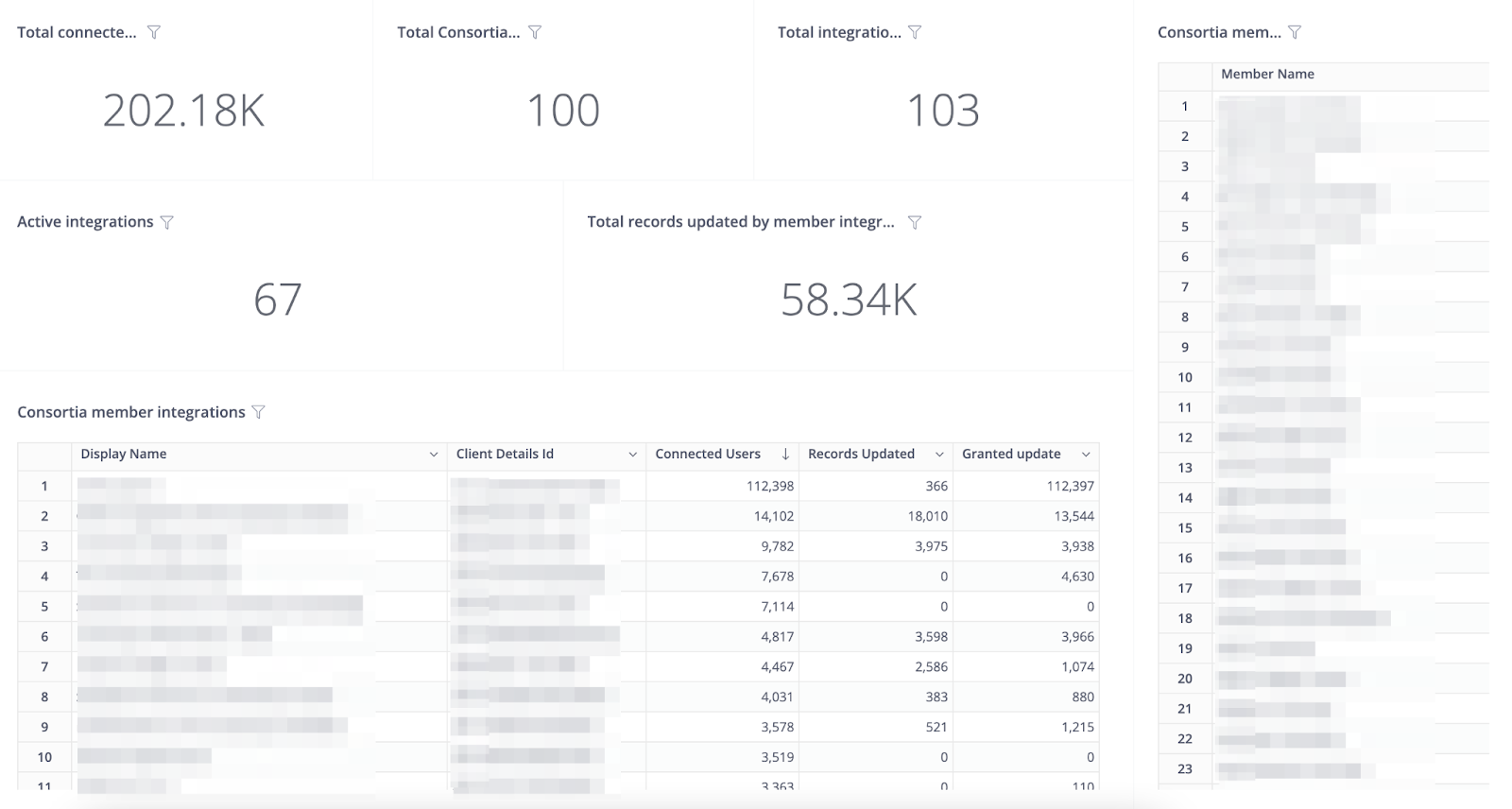
Total consortia members: The total number of members in your consortium
Total Integrations: The total of integrations in your consortium
Active integrations: The number of integrations in your consortia which have updated at least one record
Total connected iDs: The number of researchers that have granted permission to a member integration belonging to the consortia. This includes read-only and update permissions. Each researcher is only counted once, no matter how many integrations they have connected with
Records Updated
The number of researchers that have benefitted from automatic updates to their records made by members of consortia.
Consortia member integrations:
A list of integrations registered by members of the consortia, with accompanying counts of Connected iDs, records updated, what service provider system is used if applicable and if the integration is for the member portal (Affiliation Manager)
New users per year by integration: A chart showing users connecting to each of your integrations over time.
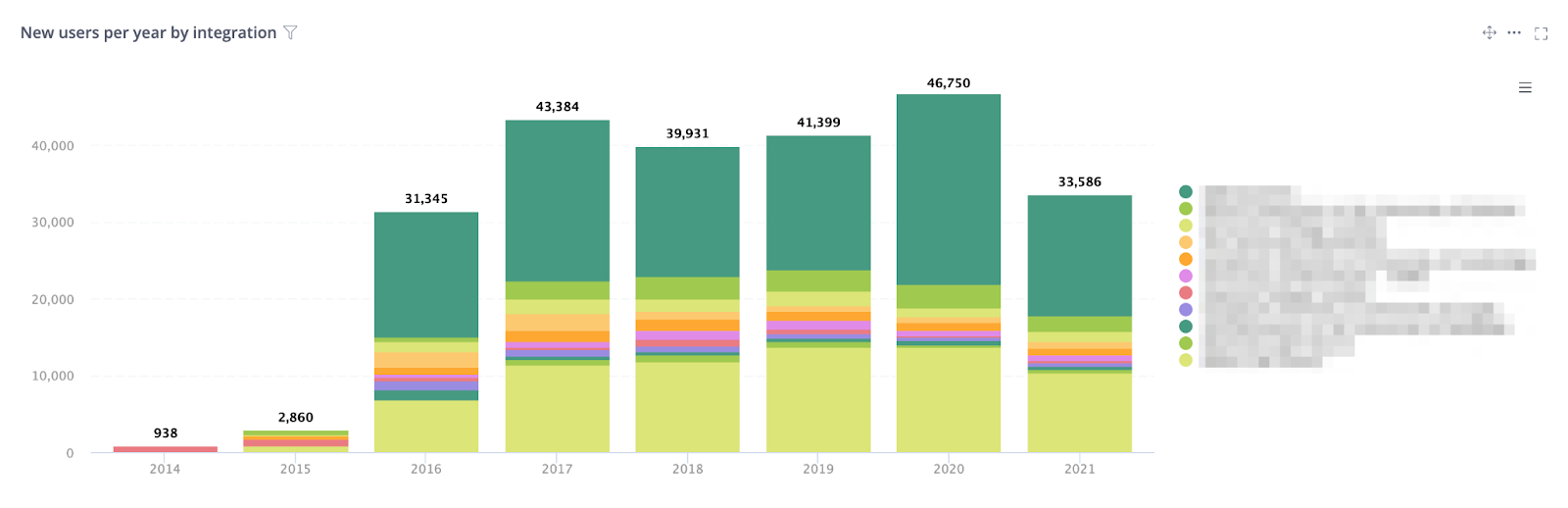
This section shows the number of researcher records consortia member integrations have updated. It can be used to understand how well consortia members are helping their researchers keep their records up to date.
Unique records updated per year: A graph showing Records Updated broken down by year. Researchers are counted for all years in which they were updated by a consortia member.
Unique iDs connected per year: A graph showing Connected iDs broken down by year. Researchers are counted for all years in which they granted permission.
Records updated per year by integration: A graph showing records updated broken down by year and integration within your consortia
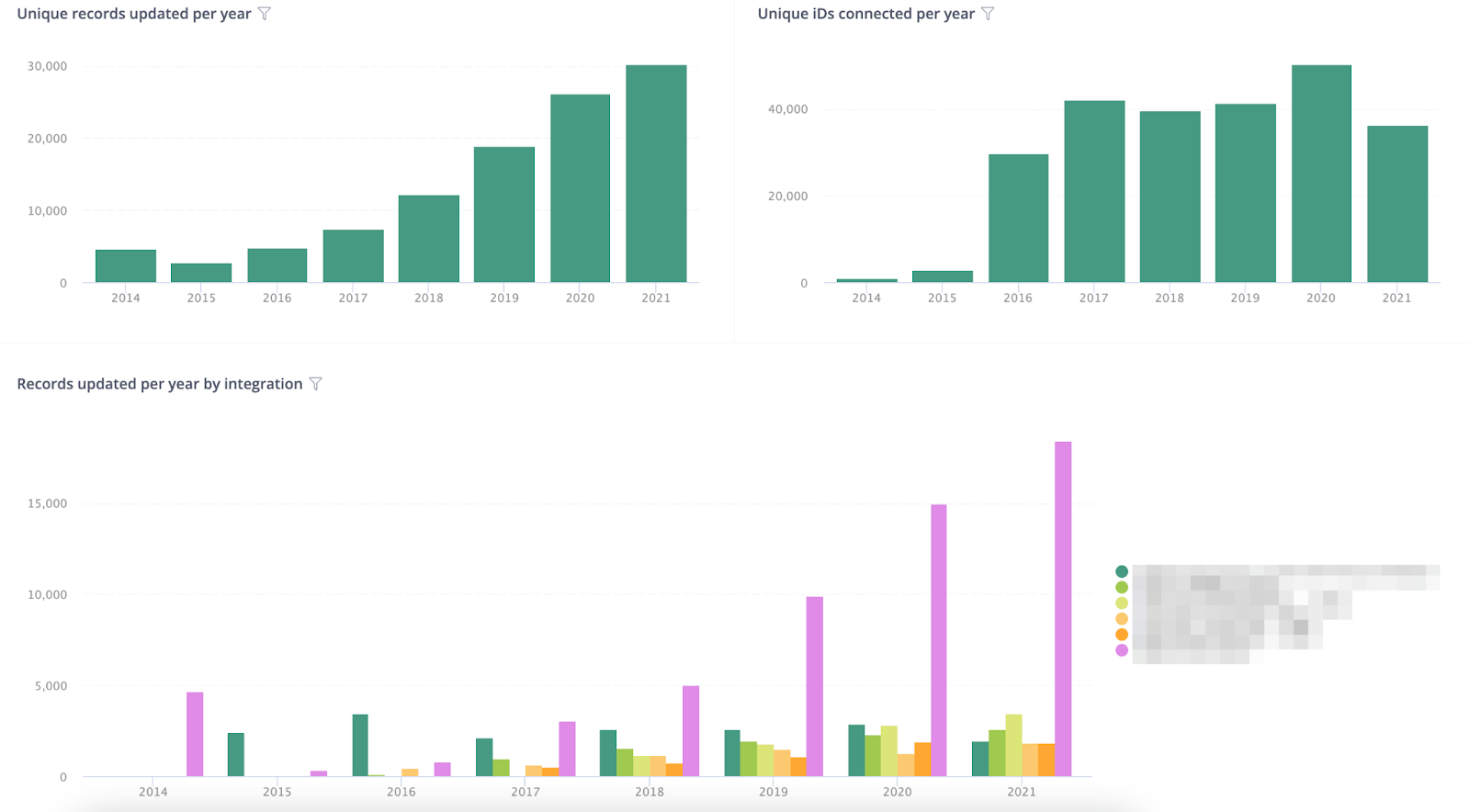
This section shows how many researchers are connected to the consortia country. This will be most relevant to national consortia. Note that information shown may or may not have been added by consortia members.
Consortia Country: Country code of your consortium
Total iDs affiliated with country: A metric showing the total number of iDs in the registry that have the consortia country code within the affiliation section of their record. Includes all affiliations, past and present
iDs with country code: A metric showing the total number of iDs in the registry that have the consortia country code within the biography section of their record.
Total iDs affiliated with country (current): A metric showing the total number of iDs in the registry that have the consortia country code within the affiliation section of their record. Only includes current affiliations, i.e. those without an end date.
Current affiliations (for all iDs with country):A table listing affiliations found on all iDs with country code, broken down by organization ID and type. Only includes current affiliations, i.e. those without an end date.

Active iDs with country code: Number of active records (signed in or record updated within the last 365 days) with consortia country code
This section shows how many researchers have registered using email domain(s) the consortia has registered with ORCID. A maximum of five email addresses may be registered.
National Email Domain: What ORCID has for your countries national email domain
Records with national domain: A count of records that have an email address with your national email domain
Email domains registered by members: A list of email domains that are registered by your consortium members
Records by member subdomain: A list of subdomains that are connected to your consortia and how many ORCID records are associated with them. Please note that this number of records may not match the total number of records with your email domain. This could be due to not all email domains registered against your consortia members will end in your national domain
Active records with national domain: Number of active records (signed in or record updated within the last 365 days) with national email domain
Records adding email domain per year: A graph showing the number of records added by per per email domain.
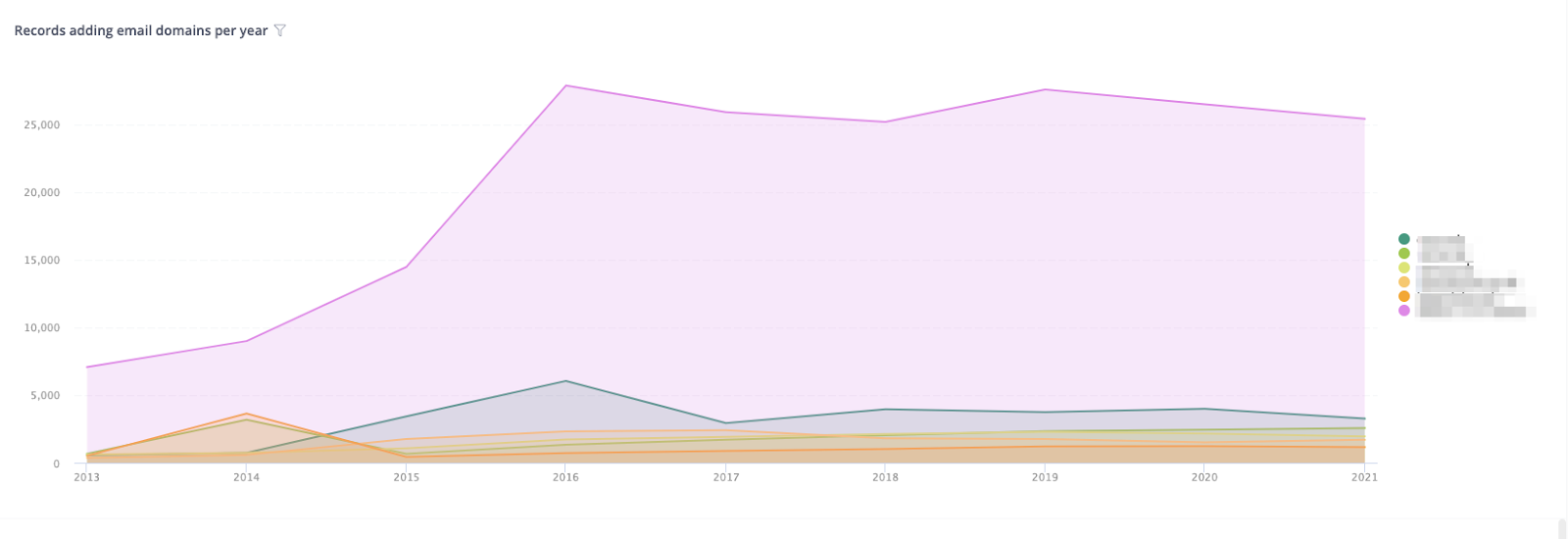
Records updated with affiliations: A metric counting how many iDs have been updated by consortia member integrations with an affiliation
Types of affiliation added: A percentage of how many of each affiliation type has been added.
Total affiliations added: A metric counting how many affiliations have been added by consortia member integrations
Consortia members adding affiliations: A list of how many affiliations have been added by consortia member integrations
Org identifiers added:A list of how many organisation identifiers have been added by consortia member integrations.


Items added per year by integration:A chart showing how many items have been added broken down by year and member in your consortia.
Records updated with works: The number of records that have had at least one work added by an integration
Total works added: The total number of works added by your integrations
Types of work added: A percentage of how many of each work type has been added, e.g. Journal Article, Preprint
Records updated with peer reviews: The number of records that have had at least one peer review added by an integration
Total peer reviews added: The total number of peer reviews added by your integrations
Records updated with funding: The number of records that have at least one funding added by an integration
Total funding added: The total number of funding added by your integrations
Records updated with research resources: The number of records that have at least one research resource added by an integration
Records updated with websites & social links:The number of records that have at least one website & social link added by an integration
Records updated with personal identifiers: The number of records that have at least one personal identifier added by an integration
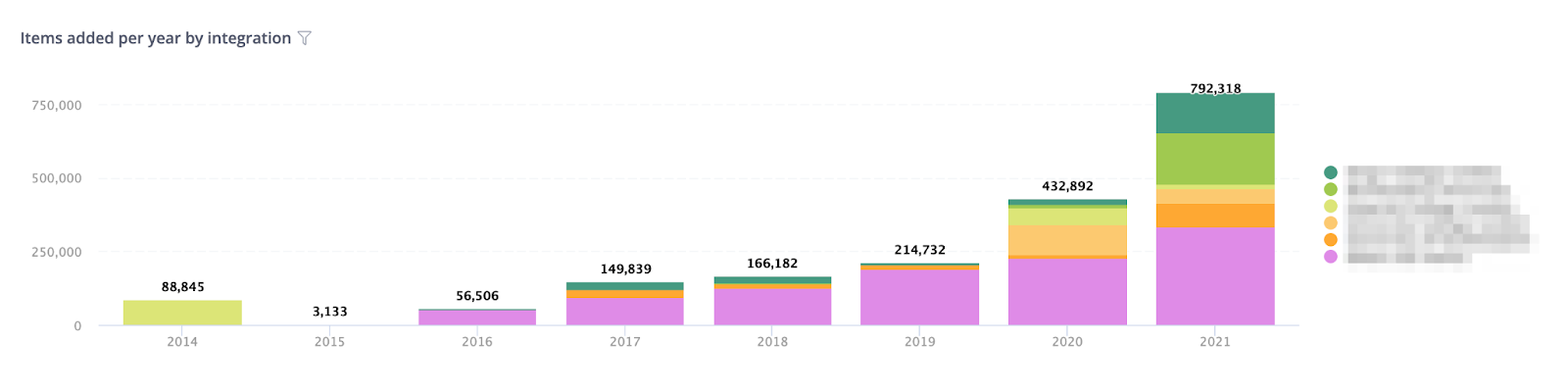
Consortia Member Affiliations Report
This report allows Consortia Leads to see the affiliation stats for their consortium members.
Consortium Members – A list of your consortium members with an affiliation count. From this list you can drill through to the individual members affiliation report to see the affiliation data in more detail. To drill though, select the member from the list, right click, select drill though and then click on the relevant report.
Consortia Member Organization IDs – A list of your consortium members registered organization IDs including the identifier type, value and name.