
Purpose
Projects are ongoing activities within the research ecosystem, involving multiple outputs, collaborators and funding streams. While a work, such as a publication, in itself can represent the outcome of a project, projects often involve multiple works, and contributor roles within a project can span beyond producing the publication. Similarly, while grants are sometimes the sole funding mechanism for a project, they are considered a component of a project, and not the project itself. Grouping a project’s inputs (contributors, tools, and funding) and outcomes (deliverables, works), under one professional activity helps track and share a project’s information consistently..
This workflow explains how individual researchers, research organizations, and funding organizations can embed ORCID iDs into project workflows to streamline processes, improve the management of project outcomes and impact, and provide recognition for contributors.
Intended Audience
This document describes a workflow that may be implemented by research organizations or funding organizations writing projects to ORCID records.
Key Benefits
- Recognize Researcher Contribution: Collecting authenticated ORCID iDs for project teams allow contributors to share information about their work and expertise with others, and to be publicly recognized for their contributions to the scholarly record.
- Automate Data Entry: Collecting authenticated ORCID iDs for all project collaborators ensures that they are recognized for their contribution, identified correctly within project metadata. It also reduces administrative burden during funding applications, project collaborations, and recording.
- Improvement Project Management and Assessment: Writing project metadata to ORCID records allows both contributors and organizations to track, assess, and report resourcing, inputs, and outputs over time to assess a project’s outcomes and impact.
- Enable Long-Term Discovery: Writing project metadata to ORCID records transparently and reliably preserve vital project information, even after a project ends. Enable long-term discovery resolution, access, sharing, reporting and other uses by the global research community.
Workflow
A typical project workflow using ORCID follows these steps, though variations may apply based on a specific use case. These steps could be implemented by a custom ORCID integration or an ORCID service provider system:
- A researcher or an organizational administrator registers a project, identifying all project contributors.
- Using the Connecting with collaborators workflow, the organization requests authenticated iDs for project contributors.
- Each project contributor grants permission for the organization to update their ORCID record.
- The organization adds information about the project as a Membership in the Professional Activities section of the researcher’s ORCID record.

If projects are registered via a RAiD Registration Agency, projects collaborators’ ORCID iDs are collected by the agency and written via RAiD (Research Activity Identifier). RAiD uses the Collecting permission via ORCID inbox workflow to gain permissions to add projects to collaborators’ ORCID records.
- A researcher or an organizational administrator registers a project, identifying all project contributors.
- Using the Connecting with collaborators workflow, a RAiD Registration Agency collects authenticated iDs for project contributors.
- A researcher’s ORCID iD is added to the RAiD project record in the Registration Authority.
- The researcher receives a notification in their ORCID inbox from the RAiD Registration Authority, asking them to grant permission to RAiD to read from and write to the researcher’s ORCID record.
- The researcher grants permission for RAiD to read and update their ORCID record.
- RAiD adds the project to the Professional Activities section of each researcher’s ORCID record automatically, as well as any future project activities.

Data Requirements
All affiliation sections use the same set of metadata in the API:
- Organization name:* The title of the project
- Role/Title: The contributor’s role or title on the project
- Department: The project title
- URL: A URL to a resource about the project
- Start date: The date the relationship between the researcher and project began (can be specified down to year, month, and day).
- End date: The date the relationship between the researcher and project ended (can be specified down to year, month, and day)
- External identifier* (RAiD or a local identifier): A unique identifier for the actual project assertion. An external persistent identifier describing the project.
*Indicates a required field.
Case Studies and Further Reading
RAiD: Research Activity Identifier
Technical Documentation
A more detailed tutorial can be found here.
Example membership XML under API v3.0 can be found here.
Related Content
Connecting with collaborators – ORCID Collecting permission via ORCID inbox
The basics
Items (works, employment, funding, peer review etc) can be added to an ORCID record either manually or using the ORCID member API. If you are an individual looking to update your record check out our help section on this here. If you are a member looking to add items to an ORCID record, you will need the following:
- The researchers permission
- Member API credentials
- And either:
- A vendor system that integrates with the ORCID Member API
- Your own system that integrates with the ORCID Member API
For a complete guide for members using the API to items to a record check out our API tutorial link below:
To support the social component we offer a toolkit of Outreach Resources to help you develop a campaign to support your integration, and communicate to your researchers:
- What ORCID is.
- Why your system collects iDs and how your system will perform tasks, such as updating their records.
- Why your researchers will benefit by creating an ORCID iD and connecting their iDs to your system.
- How ORCID benefits the wider, global research community.
We will be continually building out this “library” of resources based on feedback from the community. If you have an idea for something you might like to see, please feel free to contact us.
Integrating ORCID into your system allows your organization to collect authenticated ORCID iDs and add them to your own data. At the same time, the researcher provides the organization permission to read and write to and from their ORCID record.
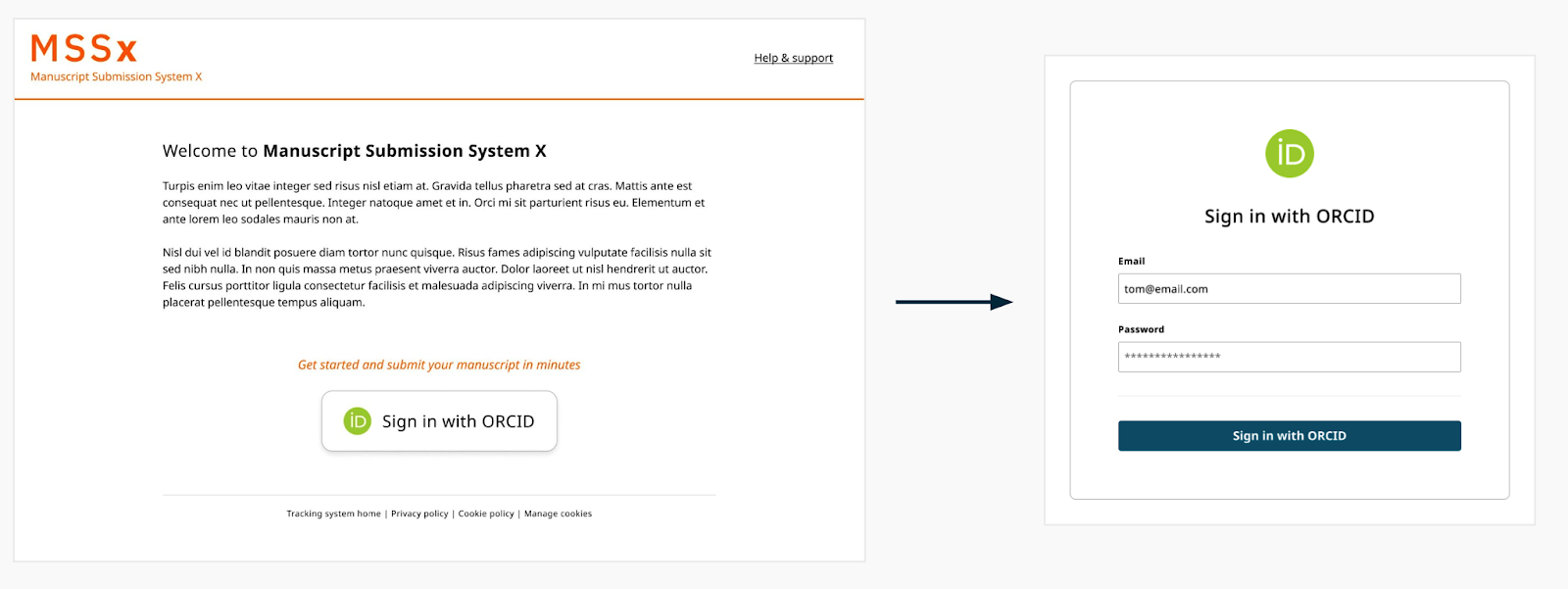
To make this work, organizations MUST obtain authenticated ORCID iDs using the ORCID OAuth API. This means they include an ORCID branded button or link within their system, that when clicked, asks the user to sign in to their ORCID record.
Once signed in, the user will be asked to authorize access to the system asking for their ORCID iD
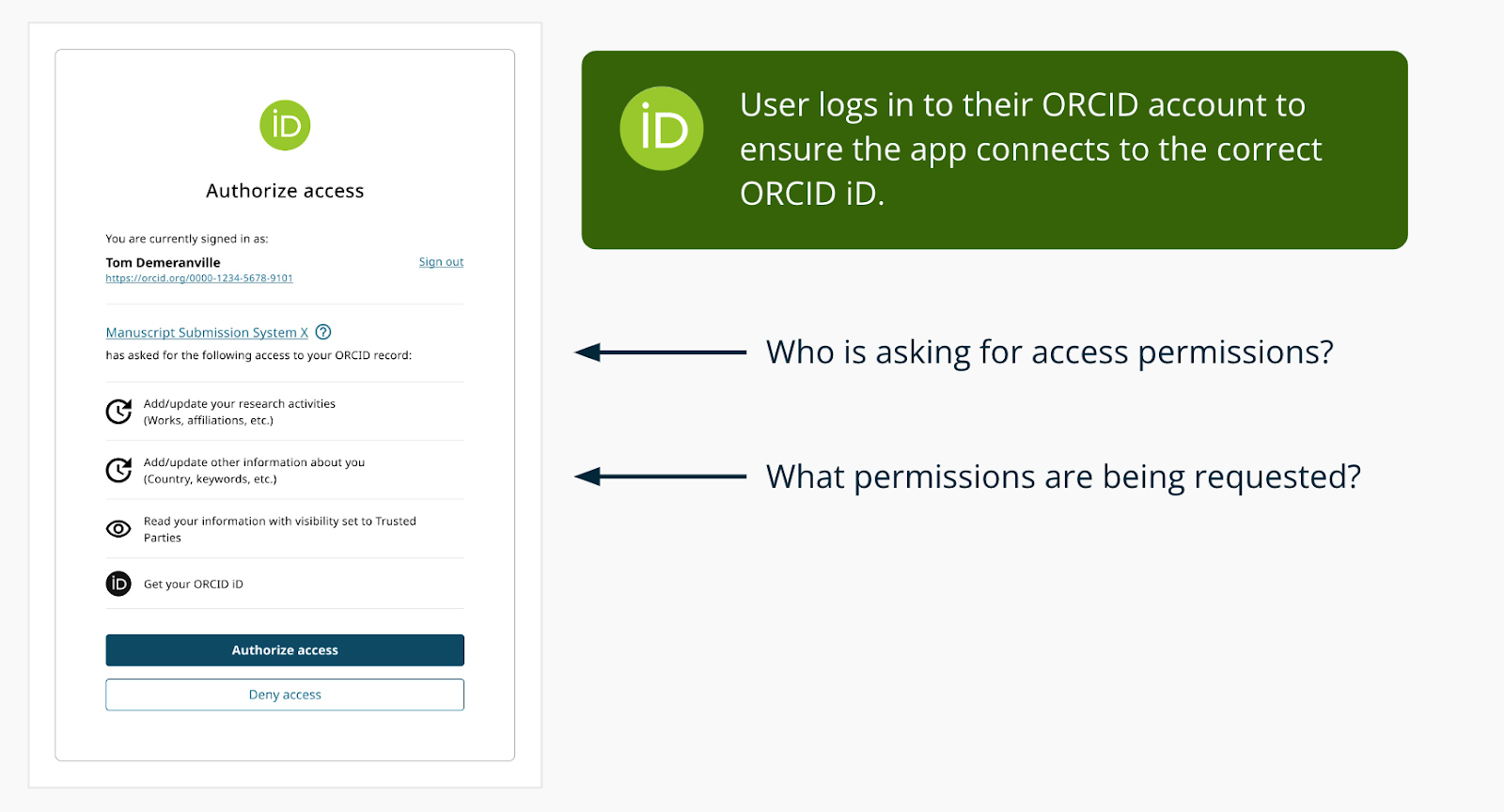
The user’s ORCID iD and name on the ORCID record (depending on visibility settings) is returned to the organization as part of this process. The system can then request additional data from the ORCID API.
The above described workflow for collecting authenticated APIs is available in both ORCID’s public and member APIs. The former is available for use free of charge by non-commercial services.
The process to get permission to add or update data on a user‚s ORCID record uses OAuth, as described in our 3 Legged OAuth FAQ. Only ORCID members can use the Member API to ask for update permissions. In simple terms it works like this:
- Your local system creates a special link
- When clicked, the user is sent to ORCID, signs in and grants permission
- ORCID sends the user back to your system with an ‘authorization code’
- Your system exchanges that code for an ‘access token’
- The access token lets you update the user’s record
ORCID strives to enable transparent and trustworthy connections between researchers, their contributions, and their affiliations by providing a unique, persistent identifier for individuals to use as they engage in research, scholarship, and innovation activities. Ensuring that the correct ORCID iD is associated with the right researcher is a critical step in building the trustworthiness of the ORCID dataset and the broader scholarly communications ecosystem. For this reason, ORCID does not permit the manual collection or entry of ORCID IDs in any workflow where it is possible to collect ORCID IDs directly from record holders themselves.
Researchers can easily and securely share their ORCID iDs with the systems they interact with, which proves they own their ORCID iD. Those systems can then share information about researcher activities with other systems, which creates a chain of validated and trusted assertions about researcher activity. The end result is that the correct person is associated with the correct activities across a broad range of scholarly information workflows.
For more information see: https://info.orcid.org/collecting-and-sharing-orcid-ids/
I have developed my integration using the Sandbox, how do I get Production Member API credentials?
Member organizations request ORCID Member API credentials on the production (live) server by completing the Production Member API client application form. Before issuing production Member API credentials, the ORCID Engagement team/Consortia Lead will review a demo of your integration in the ORCID sandbox. This gives us a chance to see the great integrations you have built and offer workflow improvements, as well as check that all integrations meet our best practices and minimal requirements for launch.
To provide a demo of your system you’ll need to set up a working integration with the ORCID sandbox that the ORCID team can preview. There are a few ways to share your working sandbox integration:
- Recommended: Live demo: Contact us to schedule a live demonstration. We’ll provide meeting software that allows you to share your screen for you to demo your integration.
- Test site: If your development site is public, send us the URL along with test credentials (if needed) to access your system and instructions describing how to use your system’s ORCID features. Provide additional documentation to verify what we would not be able to see from the user end, e.g. API version used, what data is stored by your system, etc.
- Screencast or screenshots :Send a recording or a set of screenshots with descriptions clearly explaining and demonstrating how your integration works at each step, including what happens if a user denies access or disconnects their iD. Be sure to provide additional documentation to verify anything we would not be able to see from the user end, such as API version used and how data is stored